The Best AI Notetakers in 2026: Scribe vs. Otter vs. Fireflies vs. Fathom vs. tl;dv
Not every AI meeting notetaker is worth your time or money. We tested Scribe, Otter.ai, Fireflies, Fathom, and tl;dv back to back — here's the honest breakdown to help your team pick the right one.
Every week another AI notetaker launches promising to "transform your meetings." Most of them do roughly the same thing — join your call, transcribe it, spit out a summary. So how do you actually choose?
We spent time with the five tools people talk about most — Scribe, Otter.ai, Fireflies.ai, Fathom, and tl;dv — and put them through the same set of real-world scenarios: solo consultant calls, team standups, client demos, and all-hands meetings. Here's the honest breakdown.
The Quick Answer: At a Glance
| Scribe | Otter.ai | Fireflies.ai | Fathom | tl;dv | |
|---|---|---|---|---|---|
| Price | $10/user/mo flat | $10–$20/user/mo | $10–$19/user/mo | Free + $19+/user/mo | Free + $18+/user/mo |
| Unlimited transcripts | ✅ | ❌ (300 min cap on free) | ❌ (storage limits) | ✅ on paid | ✅ on paid |
| Zoom + Teams + Meet | ✅ | ✅ | ✅ | Zoom-first | ✅ |
| AI summaries | ✅ | ✅ | ✅ | ✅ | ✅ |
| Org-wide search | ✅ | ❌ | Limited | ❌ | ❌ |
| Custom branding | ✅ | ❌ | ❌ | ❌ | ❌ |
| Multi-calendar sync | ✅ | ✅ | ✅ | ✅ | ✅ |
| Flat pricing | ✅ | ❌ | ❌ | ❌ | ❌ |
Why Most Teams Get This Decision Wrong
Before we go tool by tool, here's the thing most comparison articles miss: the bottleneck isn't transcription quality — it's what happens after.
Every tool on this list will give you an accurate transcript. The question is whether you can find what was said in a meeting three months ago, whether your team can search across everyone's calls, and whether you're paying more as your team grows or your usage spikes.
That's the lens we used.
1. Scribe — Best for Teams That Need Searchable Meeting Intelligence
Website: getscribe.xyz
Price: $10/user/month, flat. No tiers. No caps.
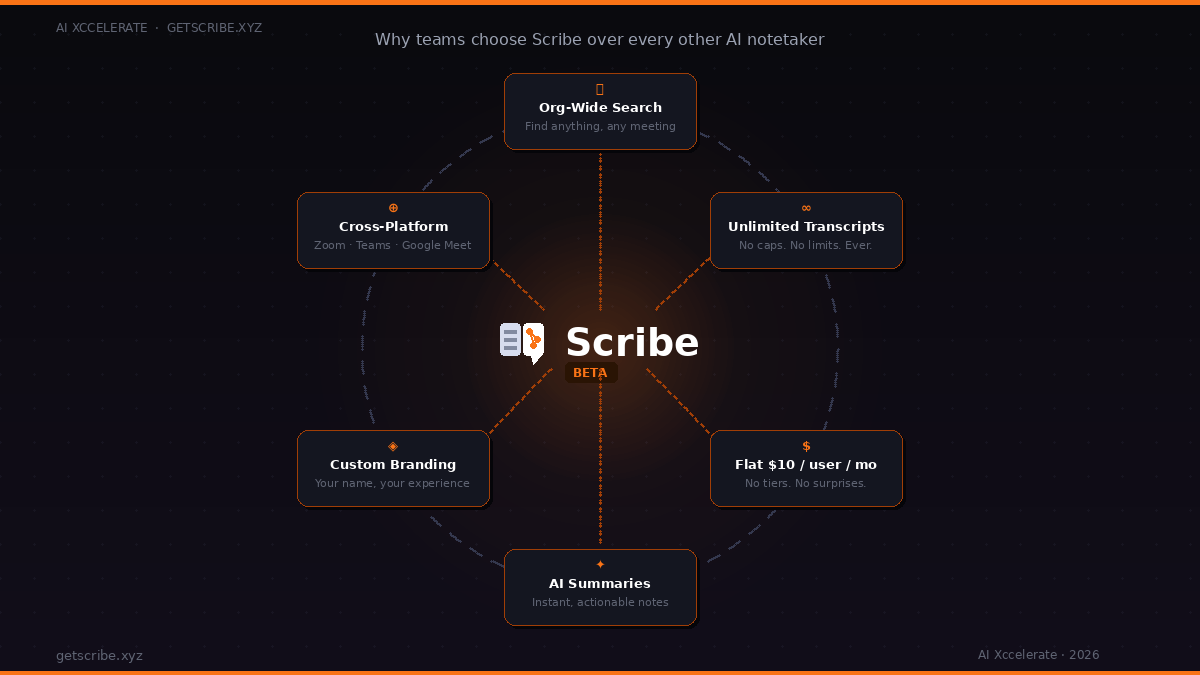
Scribe is built by AI Xccelerate and it takes a different approach from most notetakers: instead of treating each meeting as a standalone document, it treats your meetings as a searchable knowledge base.
What it does well:
- Org-wide search — find any decision, action item, or conversation from any meeting your organisation has ever had. This is rare. Most tools let you search within a transcript; Scribe lets you search across all of them at once.
- Fully branded — if you're an agency or consultancy, you can brand the experience. Your clients see your name, not a third-party tool's.
- Cross-platform — works natively with Zoom, Google Meet, and Microsoft Teams without any workflow changes on your end.
- Multi-calendar sync — syncs with multiple calendars so it never misses a scheduled meeting.
- Flat pricing — $10 per user per month. No per-minute charges, no storage overages, no "you've hit your limit" emails. What you pay on day one is what you pay on day 365.
- Powered by Recall.ai — the underlying infrastructure is enterprise-grade, which means reliability at scale.
Where it's still growing:
Scribe is a relatively newer entrant compared to Otter and Fireflies. Its clip and video highlight features (for sharing moments from calls) are not its primary focus — if that's your main use case, tl;dv may suit you better. But if search, reliability, and predictable pricing matter most, Scribe is hard to beat.
Best for: Small to mid-sized teams, consultants, agencies, and ops-heavy organisations that need to find things from past meetings — not just capture them.
2. Otter.ai — The Household Name With Hidden Limits
Price: Free (300 min/mo) · $10/user/mo (Pro) · $20/user/mo (Business)
Otter is the tool most people try first because it's the most Googled. And to its credit, it works well for basic use — the transcription is clean, the mobile app is polished, and the integration with Zoom is one-click.
The problem is the ceiling.
The free tier caps you at 300 transcription minutes per month — that's roughly 5 hours of meetings. Most people hit this in week one. Moving to Pro removes the cap but introduces a 90-minute per-conversation limit. Jump to Business to lift that, and you're at $20/user/month, which adds up fast for larger teams.
The other issue: Otter's search is per-user, not org-wide. You can search your own transcripts, but you can't search across your entire team's meeting history. For a sales team trying to pull up a prospect conversation from Q1, that's a real limitation.
Best for: Individuals and very small teams who primarily use Zoom and want a well-known, easy-to-set-up tool with a gentle learning curve.
3. Fireflies.ai — Feature-Rich but Complex
Price: Free (limited storage) · $10/user/mo (Pro) · $19/user/mo (Business)
Fireflies does a lot. It transcribes, summarises, lets you create soundbites, integrates with 40+ CRMs, and has a "Ask Fred" AI assistant that can answer questions about your meetings. For teams that live in Salesforce or HubSpot, the CRM auto-logging alone can save hours.
But "does a lot" can also mean "does many things partially." Users consistently report that the AI summaries are verbose and need editing before they're actually useful. The free tier limits storage, meaning old transcripts can get inaccessible unless you pay up. And the pricing jump from Pro to Business is steep if you want the collaboration features.
The interface is also busier than most alternatives — fine once you're used to it, but the onboarding learning curve is real.
Best for: Sales teams and RevOps organisations that need deep CRM integration and don't mind paying for the Business tier.
4. Fathom — The Best Free Option, With Trade-offs
Price: Free (unlimited recordings) · $19/user/mo (Premium) · $29/user/mo (Team)
Fathom's free tier is genuinely generous — unlimited recordings, unlimited transcripts, AI summaries, and highlights. For an individual, it's legitimately hard to argue with free.
The catch? Fathom is Zoom-first. Google Meet and Teams support exists but is more limited and occasionally unreliable. If your organisation uses a mix of platforms, you'll hit friction.
The other limitation is that Fathom is built around individual productivity, not team knowledge. There's no org-wide search, no way to surface what a colleague's customer said about a specific competitor, no institutional memory. Each user's meetings exist in their own silo.
For freelancers and individual consultants who live in Zoom? Fathom is excellent and free. For teams? The value drops quickly.
Best for: Freelancers, coaches, and individual contributors who are on Zoom all day and want a zero-cost solution.
5. tl;dv — Best for Video Highlights and Async Teams
Price: Free (limited) · $18/user/mo (Pro) · $59/user/mo (Business)
tl;dv (short for "too long; didn't view") is built around a specific use case: clipping and sharing moments from meetings. If you regularly send a Loom-style clip of a key moment from a customer call to a colleague who wasn't there, tl;dv makes that seamless.
The AI summaries are good. The highlights and clip-sharing interface is the best in class. And it works across Zoom, Teams, and Meet.
The limitations: the free tier is constrained enough that most teams will need to pay, and the Business tier at $59/user/month is expensive for what you get if clipping isn't your primary workflow. Like Fathom, there's no org-wide search — you're working with your own recordings only.
Best for: Product managers, UX researchers, and customer success teams who frequently share specific moments from calls with colleagues who weren't on the call.
Mid-Point Check: What Actually Matters for Your Team?
Here's a simple framework to cut through the noise:
- If your primary need is search — finding decisions, action items, or conversations from the past — Scribe wins.
- If you're an individual on a budget who lives in Zoom — Fathom's free tier is the right call.
- If you're a sales team needing CRM auto-logging — Fireflies Business makes sense.
- If you share video clips from calls constantly — tl;dv is built for you.
- If you want something simple and well-known to start with — Otter gets the job done at the entry level.
The honest truth is that most teams outgrow their notetaker tool within six months. The ones that don't go back to the market usually chose something with org-wide search and predictable pricing from the start.
Ready to stop losing what was said in your last 100 meetings?
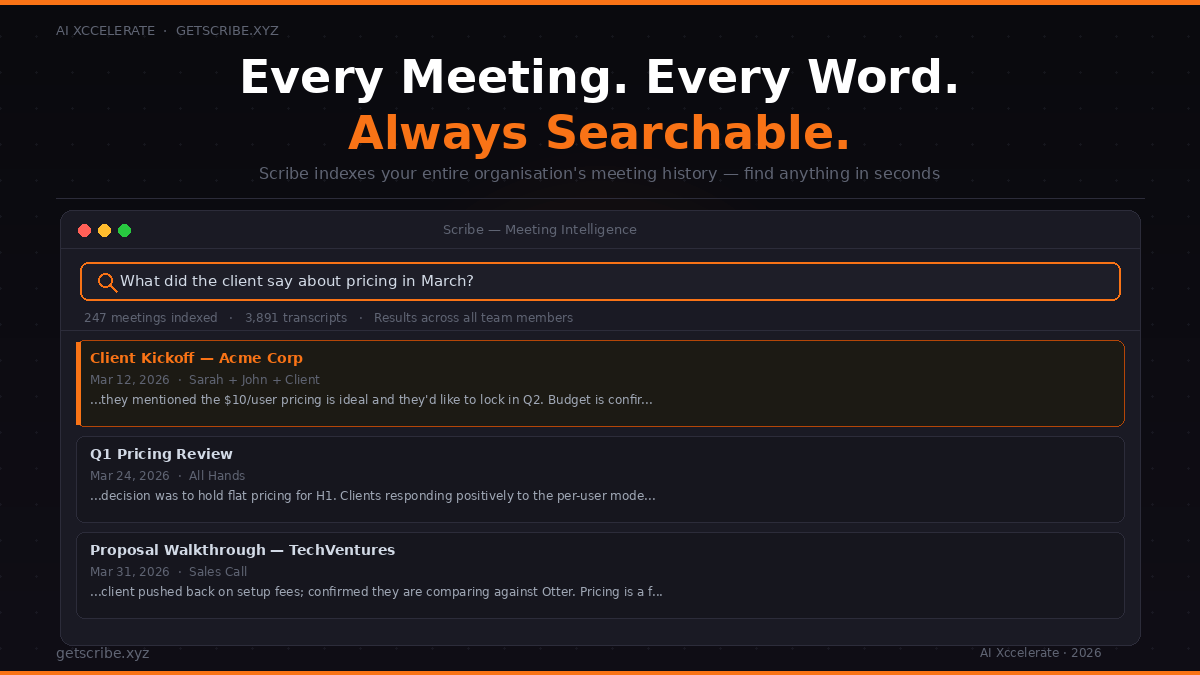
Scribe indexes every transcript your team generates — so the answer to "what did the client say about pricing in March?" is always one search away.
Try Scribe at getscribe.xyz — $10/user/month, unlimited, no surprises.
The Pricing Reality Check
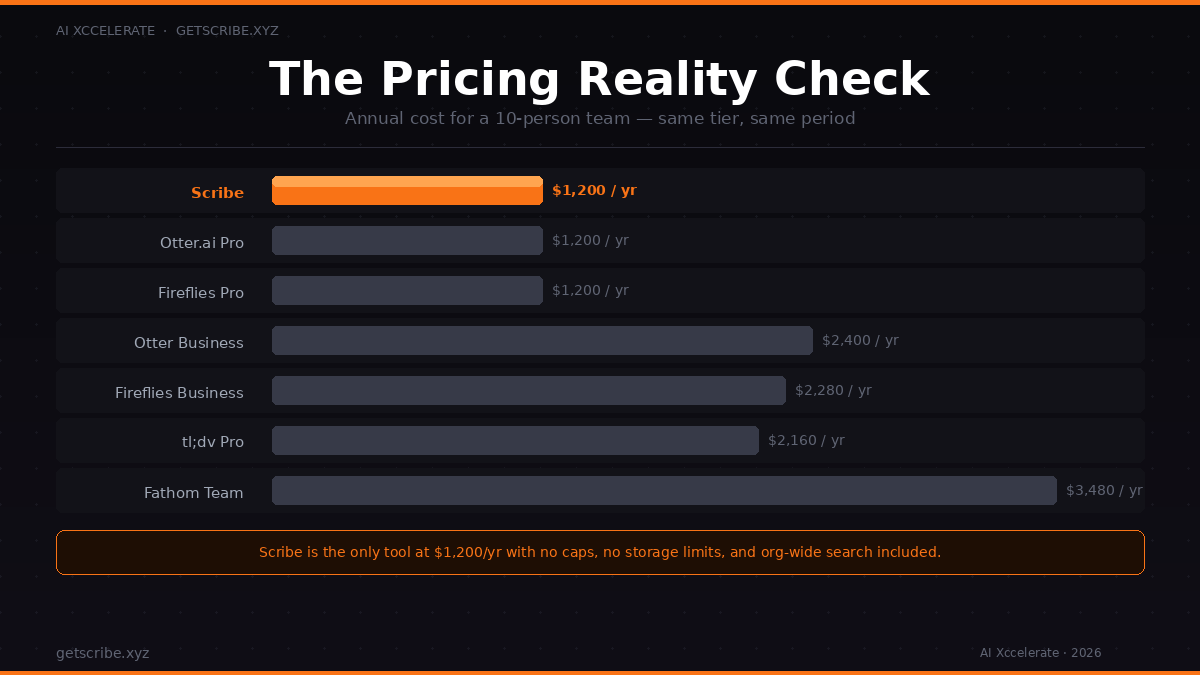
Let's run the numbers for a 10-person team over 12 months:
| Tool | Annual cost (10 users) | Notes |
|---|---|---|
| Scribe | $1,200 | Flat. No caps. No overages. |
| Otter.ai Pro | $1,200 | 90-min per-conversation limit |
| Otter.ai Business | $2,400 | Needed for teams with longer calls |
| Fireflies Pro | $1,200 | Storage limits apply |
| Fireflies Business | $2,280 | For full collaboration features |
| Fathom Team | $3,480 | If you need the team features |
| tl;dv Pro | $2,160 | Clip-focused |
At the Pro tier, Scribe and Otter and Fireflies are all around $1,200/year for 10 users — but Scribe is the only one with no caps, no storage limits, no per-minute ceiling, and org-wide search included at that price.
What About Zoom AI Companion and Notion AI?
Worth addressing since these come up. Zoom AI Companion is only useful if every meeting happens on Zoom — the moment you join a Teams or Meet call, you're outside its coverage. Notion AI is excellent for documents but it is not a meeting notetaker; it has no bot to join your calls.
Neither replaces a dedicated AI notetaker for teams that meet across platforms or need to search their meeting history.
Our Verdict
If you're a solo user on a budget, Fathom's free tier is a no-brainer. If you're a sales team in Salesforce, Fireflies Business makes sense. If you primarily want to clip and share video moments, tl;dv is the move.
But if you're building a team — one where institutional knowledge matters, where people need to pull up what was discussed in a meeting they weren't on, where you want predictable costs as you scale — Scribe is the one tool that's actually designed for that problem.
At $10/user/month flat, with unlimited transcripts, AI summaries, multi-calendar sync, and org-wide search baked in, it's not just a notetaker. It's meeting intelligence infrastructure.
And the branding? That's the thing that will matter more than you expect the moment a client asks what tool is joining their calls.
Stop losing your meeting intelligence.
Scribe captures, transcribes, and makes every meeting searchable — across your entire organisation, not just your own calendar.
Works with Zoom, Google Meet & Microsoft Teams
Unlimited transcripts, AI summaries, org-wide search
Flat $10/user/month — no caps, no tiers, no surprises
Fully branded — your name, your experience
Get started at getscribe.xyz →
Frequently Asked Questions
Is Scribe free to try?
Visit getscribe.xyz to get started. Scribe is priced at a flat $10/user/month with no hidden limits.
Which AI notetaker is best for Google Meet?
Scribe, Otter.ai, Fireflies, and tl;dv all support Google Meet. Fathom is primarily Zoom-focused.
Can AI notetakers search across my whole team's meetings?
Most cannot — search is per-user. Scribe is the notable exception, offering org-wide search across all team transcripts.
Is Otter.ai really unlimited?
No. The free tier caps at 300 minutes/month. The Pro tier has a 90-minute per-conversation limit. You need Business for unrestricted use.
What does "branded AI notetaker" mean?
Scribe allows agencies and teams to present the tool under their own brand — so when a bot joins a client meeting, it carries your name, not a third-party vendor's.